Corpo: The Modern Template for Your Next Presentation
You’ve done the hard work. You have the data, the strategy, the big idea. Now comes the part that makes many professionals sweat: turning that substance into a presentation that actually holds attention. We’ve all sat through slideshows that feel like they were designed in a different decade, cluttered with bullet points and mismatched clip art. The Corpo - Powerpoint Template is built for the opposite experience. It’s a clean, contemporary, and versatile framework designed to make your content look as sharp as it is smart, without you needing a design degree.
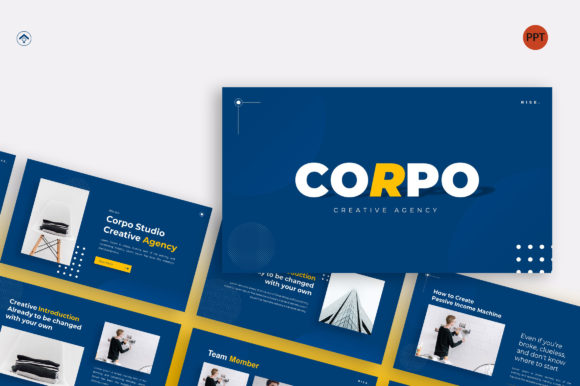
At its core, Corpo is about clarity and professionalism. The visual style leans into modern design principles—think ample white space, a balanced grid structure, and a restrained, sophisticated color palette that you can easily adapt to any brand. It doesn’t shout with flashy animations; instead, it earns attention through clean lines, strong visual hierarchy, and a layout that guides your audience’s eye exactly where it needs to go. This isn’t just a collection of pretty slides; it’s a strategic tool built on Master Slides, which means you can make a global change to a font or color once, and it updates across all 36 slides. For anyone who’s ever wasted hours manually fixing formatting on slide 32, this is a game-changer.
Where Corpo Truly Shines: Real-World Applications
The true test of any design asset is its versatility. Corpo’s strength lies in its ability to adapt to a wide range of professional scenarios while maintaining a consistent, high-quality brand identity. Its clean aesthetic makes it a natural fit for corporate and business presentations, annual reports, or internal strategy decks where credibility is key. The same structure, however, works beautifully for a startup pitch deck. The modern, uncluttered layout allows your innovative idea to take center stage, while the professional polish helps build instant trust with potential investors.
But its utility extends far beyond the boardroom. Are you a brand agency presenting a new client identity? The template’s focus on clean typography and image placeholders lets your logo design and visual concepts breathe. A construction or architecture firm can use the wide-screen ratio to showcase project renders and site plans with cinematic impact. For a personal portfolio, the drag-and-drop picture placeholders and editable graphics allow you to create a stunning case study presentation in minutes, not days. It even serves product promotion effectively, providing a structured narrative flow from problem to solution to features.
Practical Guidance for Integrating Corpo into Your Workflow
So, how do you get the most out of it? First, recognize that Corpo is a premium font and layout system. The included documentation is your best friend—it will walk you through the Master Slides and placeholder setup. Before you even open the file, have your content and key images ready. The template’s power is unlocked when you use its structure to organize your narrative, not just to decorate existing slides.
When it comes to customization, think in terms of consistency. The template uses recommended free web fonts, which is a huge plus for ensuring your presentation looks the same on any machine. Stick to two, maybe three, font styles from the provided options for your headings, subheadings, and body text. This maintains the clean visual hierarchy the template is designed for. Use the 16:9 aspect ratio to your advantage; it’s perfect for modern displays and allows for impactful, full-bleed images that create an immersive viewing experience. Remember, all graphics are resizable and editable, so you can tweak icons and shapes to better match your specific branding.
Key Features That Make a Difference
- Master Slide Foundation: Edit once, update everywhere. This is the backbone of efficient, consistent presentation design.
- Picture Placeholder Simplicity: The "just drag and drop" functionality removes the friction from adding visuals, letting you focus on storytelling.
- Professional Aspect Ratio: The 16:9 widescreen format is now the standard, ensuring your presentation looks native on any modern screen or projector.
- Comprehensive Slide Count: With 36 slides, you have enough variety for a full deck without feeling overwhelmed by hundreds of unused options.
Ultimately, the Corpo - Powerpoint Template is less about flashy effects and more about providing a solid, professional foundation. It’s for the entrepreneur who needs to look established, the marketer who needs to present data clearly, and the creative who needs a sophisticated canvas for their work. It saves you time on the technical grind of presentation design so you can invest your energy where it matters most: in the message itself. If you’re ready to move beyond basic slides and create presentations that feel polished, modern, and strategically designed, Corpo is a tool worth having in your arsenal.