Fight GoogleSlide Templates: Bold Impact for Modern Presentations
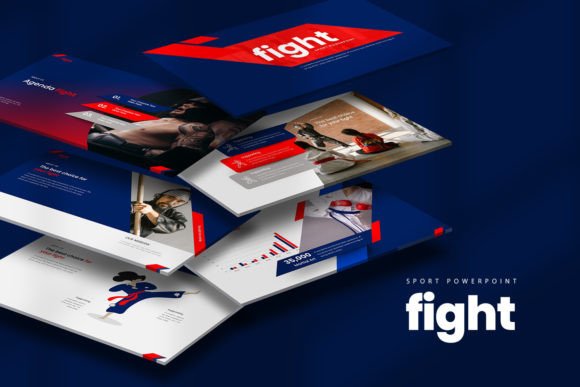
When you're building a presentation that needs to land with authority, the template you choose sets the entire tone. Fight GoogleSlide Templates is designed for exactly those moments—when you need your slides to feel sharp, confident, and unmistakably professional without sacrificing visual interest. This isn't a template that fades into the background. It commands attention through clean geometry, strong typographic hierarchy, and a design language that balances creative energy with corporate polish.
What makes Fight stand out immediately is its versatility across different presentation contexts. The 30 unique slides (60 total across white and dark background versions) give you enough range to build anything from a startup pitch deck to a quarterly business review without running out of layout options. The 16:9 aspect ratio is standard for modern displays, so you won't encounter awkward cropping or wasted screen space. Everything is built on a single cohesive color scheme that keeps your visuals unified while still allowing room for your own brand elements to breathe.
A Template That Works as Hard as You Do
One of the most practical aspects of Fight GoogleSlide Templates is how thoroughly editable it is. Every element—charts, icons, text boxes, image placeholders—can be customized directly within Google Slides or PowerPoint using the included PPTX files. The charts are editable in Excel, which means you can update data without rebuilding your visuals from scratch. For anyone who has spent hours wrestling with locked layers or rasterized graphics in other templates, this level of flexibility matters enormously.
The included vector icons are a particular strength. Rather than relying on generic clip art or requiring you to source separate design assets, Fight ships with icons that match the template's visual personality. This creates consistency across your slides and saves significant time during the design phase. Combined with the image placeholders, you can drop in your own photography or stock images and have a polished slide ready in minutes rather than hours.
The documentation and quick guide file deserves mention too. If you're not a designer by trade—and many people using presentation templates aren't—having clear instructions for installation, font setup, and customization removes a real barrier. Fight uses free fonts, which eliminates the licensing headaches that come with premium font dependencies. Just install the fonts before opening the presentation, and everything renders as intended.
Where Fight Truly Shines
The personality of Fight GoogleSlide Templates leans toward modern minimalism with an edge. It doesn't rely on ornamental flourishes or decorative excess. Instead, it uses whitespace strategically, employs strong visual hierarchy through scale and contrast, and maintains a rhythm across slides that keeps audiences engaged without overwhelming them. This makes it particularly effective for presentations where credibility and clarity matter as much as aesthetics.
Entrepreneurs pitching to investors will find that Fight's clean structure supports narrative flow—each slide builds logically on the last, guiding viewers through your argument without visual distractions. Marketers presenting campaign results or brand strategy decks benefit from the template's ability to showcase data clearly through its editable charts and infographic layouts. Corporate teams preparing internal communications or client-facing reports will appreciate the professionalism that Fight conveys without feeling sterile or overly formal.
For creative professionals—designers, content creators, bloggers—Fight offers enough visual flexibility to support portfolio presentations, workshop materials, or social media strategy decks. The dark background version adds dramatic weight for evening presentations or creative showcases, while the white background version keeps things crisp and accessible for everyday business use. This dual-version approach means you're essentially getting two distinct moods from a single template package.
Practical Guidance for Getting the Most from Fight
Before committing to any presentation template, it's worth evaluating whether its visual language aligns with your message. Fight works best when your content benefits from a structured, confident presentation style. If you're building a playful children's workshop or an overtly whimsical brand presentation, you might find its geometric precision too rigid. But for business pitches, marketing decks, educational content, corporate training, and professional portfolios, Fight's design sensibility is a genuine asset.
Font pairing is worth considering even though Fight includes its own typography. If you're integrating Fight slides into a larger brand system, test how the included fonts interact with your existing typeface choices. Consistency across touchpoints—your website, social media graphics, printed materials, and presentations—reinforces brand identity and builds recognition over time. The clean sans serif style used in Fight pairs well with both serif fonts for contrast and other sans serif families for cohesion.
Take advantage of the editable charts by preparing your data in advance. Updating figures directly in Excel and having them reflect automatically in your slides is far more efficient than manually adjusting numbers. Similarly, plan your imagery before you start customizing. Knowing which photos or graphics you'll use helps you make better decisions about slide layouts and color adjustments.
The commercial flexibility of Fight GoogleSlide Templates makes it suitable for client work, internal business use, and personal projects alike. Whether you're a small business owner building your first pitch deck, a freelancer preparing a client presentation, or a marketer developing training materials for your team, the template adapts to your needs rather than forcing you to adapt to it.
Ultimately, Fight GoogleSlide Templates delivers on a straightforward promise: professional, modern presentations that are genuinely easy to customize. The combination of thoughtful design, practical features like vector icons and Excel-linked charts, and the convenience of free fonts makes it a reliable addition to any designer's or professional's toolkit. It won't do the thinking for you—but it will make sure your ideas look as sharp as they deserve to.