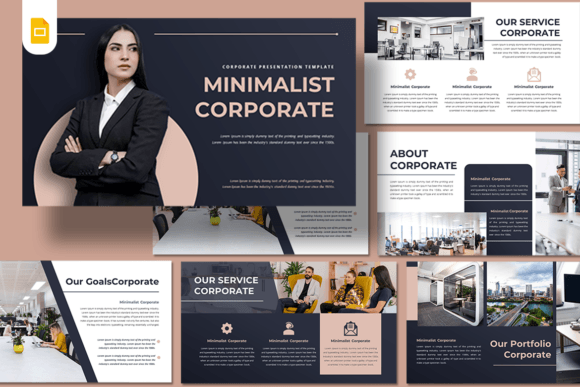
Minimalist Corporate - Google Slides: Your Blueprint for Clear Communication
When you need to convey competence and clarity without the clutter, your presentation style speaks before you do. In a world saturated with noisy graphics and overly complex animations, the Minimalist Corporate - Google Slides template offers a breath of fresh air. It is not just a collection of slides; it is a strategic tool designed for professionals who value substance over flash. Whether you are a startup founder pitching to investors or a creative agency showcasing a portfolio, this template provides the structural integrity needed to make your content shine.
The Power of Visual Restraint
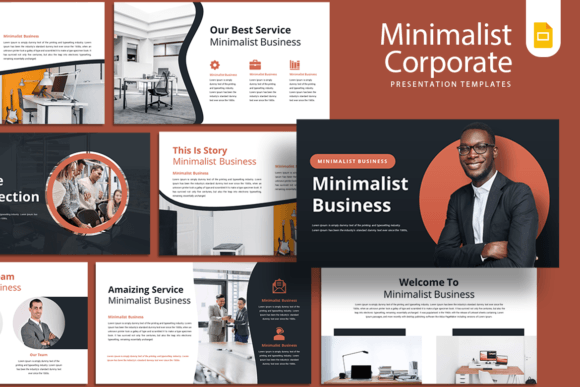
The core personality of this template is rooted in modern typography and strategic negative space. It avoids the trap of "boring" by utilizing a sophisticated layout where every element has a purpose. You will notice a clean sans serif font hierarchy that guides the viewer's eye naturally from the headline to the supporting body text. This isn't just about looking good; it is about readability. By stripping away unnecessary decorative elements, the design ensures that your audience focuses on your data, your story, and your value proposition. The visual style is professional yet approachable, making it suitable for corporate boardrooms and creative workshops alike.
One of the standout features is the drag and drop image functionality. In the past, customizing a premium template required digging through layers to replace a photo. Here, the image placeholders are intuitive. This ease of editing means you can adapt the Minimalist Corporate - Google Slides presentation for different clients or projects in a fraction of the time. It respects your workflow, allowing you to focus on strategy rather than wrestling with software mechanics.
Where This Template Excels
Versatility is the hallmark of a great design asset. While the name suggests a corporate environment, the utility of this template extends far beyond quarterly reports. Its 15 unique custom slides offer a framework that adapts to various industries.
For a Creative Agency, the clean backdrop allows high-resolution photography and bold graphics to take center stage. When presenting a brand identity guide, the neutral color palette ensures that your proposed brand colors are not competing with the slide design. Startup founders will find the layout particularly useful for pitch decks, where clarity and flow are critical to keeping investors engaged. The structure forces you to be concise, which is often the key to a successful pitch.
Furthermore, this template is an excellent choice for Personal Portfolio presentations. Photographers and designers often struggle to present their work without the medium overshadowing the message. The minimalist approach here acts like a gallery wall—presenting your work with the respect it deserves. It is also highly effective for Company Profile decks, helping to establish a sense of stability and trustworthiness through consistent design language.
Practical Implementation and Design Tips
Simply downloading a template is only the first step; implementation is where the magic happens. To get the most out of the Minimalist Corporate - Google Slides package, consider how you treat the visual hierarchy. The template provides a strong typographic foundation, but you need to ensure your content supports it. Keep your bullet points concise. If a slide feels crowded, split the content into two slides. White space is your friend in minimalist design; do not be afraid to leave areas of the slide "empty" to let the content breathe.
Color theory plays a significant role in how your audience perceives your message. While the default colors are professional, the template is fully editable. If you are preparing a deck for a client with specific brand guidelines, take the time to update the accent colors. This small detail elevates the presentation from a generic template to a bespoke marketing tool. When selecting fonts, stick to the provided sans serif font for body text to maintain legibility, but feel free to experiment with a complementary serif font for headlines if you want to add a touch of editorial elegance.
Finally, remember that the 16:9 ratio