Project Management Slides Template: A Guide to Modern Clarity
Presentations are where ideas gain momentum. Whether you're pitching a new service, reporting on quarterly progress, or outlining a marketing strategy, the visual framework you choose sets the stage. A cluttered, over-designed slide deck can distract from your message, while a clean, structured one amplifies it. The Project Management Slides Template is built on this principle of amplified clarity. It’s not about flashy animations or complex graphics; it’s about providing a minimalist, professional canvas that lets your content—the data, the strategy, the narrative—take center stage. For entrepreneurs, marketers, and creative professionals, this approach is invaluable. It respects the audience's time and intelligence, presenting information in a way that is immediately digestible and credible.
The Anatomy of a Clean & Modern Template
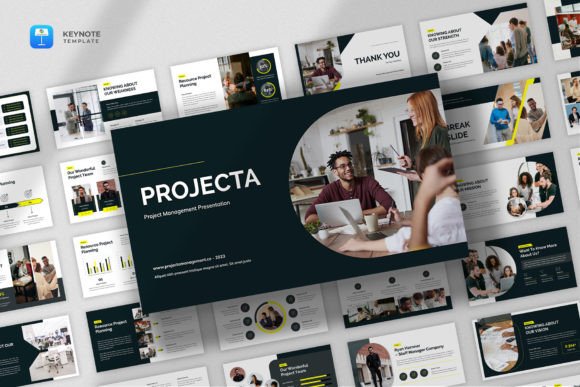
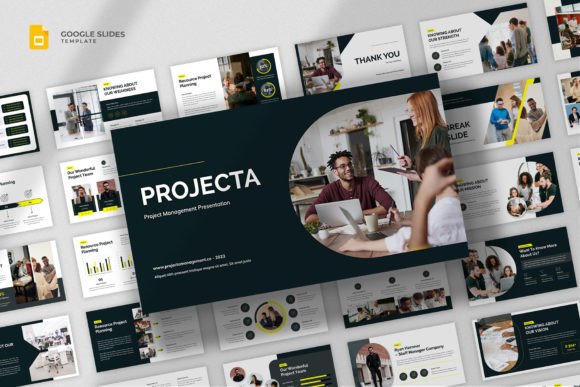
At its core, the Projecta - Project Management Google Slides Template is a study in effective restraint. Its visual personality is defined by generous white space, a clear typographic hierarchy, and a limited, sophisticated color palette. This isn't a template that shouts; it communicates with quiet confidence. The style is decidedly modern and professional, leaning into the principles of Swiss design where grid systems and structured layouts guide the viewer's eye seamlessly from one piece of information to the next. The resizable and editable graphics are a practical touch, allowing you to adapt charts, timelines, and diagrams without compromising the template's inherent balance. This adaptability is key for brand identity work, ensuring your presentation aligns perfectly with your company's established visual language.
This minimalist aesthetic has a powerful effect on readability and visual hierarchy. With 25 total slides, the template provides a curated library of layouts—from project proposals and schedules to scrum boards and final reports. Each slide uses whitespace not as empty space, but as an active design element that frames content, reduces cognitive load, and emphasizes what matters most. For a marketing team presenting a campaign plan, this means the key metrics and action items are instantly visible. For a small business owner pitching to investors, the clean lines and structured data convey professionalism and operational maturity. The 16:9 wide screen layout is the modern standard, ensuring your presentation looks sharp on any monitor or projector, reinforcing a sense of contemporary competence.
Strategic Applications Across Industries
The true strength of a multipurpose project management presentation template lies in its versatility. This isn't a one-trick pony designed only for internal project updates. Its clean, minimalist foundation makes it a powerful design asset for a surprising range of contexts. Consider these real-world applications:
- For Creative Professionals & Agencies: Use it for portfolio presentations. The neutral backdrop allows your design work, photography, or writing samples to shine without visual competition. It’s perfect for client onboarding decks or project briefs, where clarity and process are paramount.
- For Startups & Entrepreneurs: Craft a compelling project proposal or investor pitch. The structured slides for timelines, budgets, and team roles help tell a story of organized growth and realistic planning, which builds investor confidence.
- For Marketing & Content Teams: Develop social media graphics reports, content calendar overviews, or campaign post-mortems. The template’s charts and infographic elements translate complex data into understandable visuals, making it easier to share insights with stakeholders.
- For Consultants & Educators: Deliver workshops, training sessions, or strategic recommendations. The consistent, professional style ensures your material is taken seriously and enhances brand perception as a trusted expert.
The key is to view the template as a flexible system. The 100% free fonts included are chosen for their modern typography and readability, but the template’s clean structure also pairs beautifully with a premium font from your own collection if you need to match specific brand identity guidelines. This blend of ready-to-use functionality and customizable potential is what makes it a valuable tool for digital and print projects alike.
Practical Guidance for Implementation
Adopting a new template is more than just swapping out text. To get the most from the Project Management Slides Template, a thoughtful approach is needed. First, evaluate the project fit. Does your content require dense data visualization? The included charts are perfect. Is it a narrative-driven pitch? Focus on the title and section divider slides to set a compelling tone. The template’s structure is a guide, not a cage.
Next, test your font pairings if you choose to customize. The provided fonts are excellent sans-serifs for body text, but you might pair them with a complementary serif font for headlines to add a touch of classic sophistication, or a subtle script font for a logo slide to introduce personality. Always prioritize readability—ensure sufficient contrast and size, especially for on-screen viewing. The resizable graphics are a major advantage here; you can adjust elements to fit your content flow without breaking the design grid.
Finally, understand the licensing. The template is included as a .PPTX file for Google Slides, making it incredibly accessible for teams. The included help file is a resource worth skimming—it often contains tips on editing master slides or replacing graphics efficiently. Remember, the images in the preview are for demonstration; your own content and visuals will define the final presentation. By starting with a foundation of simple, clean design, you give your project the best chance to communicate with the clarity and professionalism it deserves.